


Introduction to Proxy Servers
The internet has become a part of our daily lives. Whether you are browsing websites, watching videos, downloading files, using social media, or working remotely, your device constantly communicates with servers across the world. Every time you visit a website, your device shares information such as your IP address, location, browser details, and network information. Many people do not realize how much information is exposed during a simple web request.
This is where a proxy server becomes useful. A proxy server acts as a middleman between your device and the internet. Instead of directly connecting to a website, your request first goes to the proxy server. The proxy server then forwards your request to the website and returns the response back to you. The website sees the proxy server’s IP address rather than your actual IP address. This process can improve privacy, security, content filtering, and network management.
Table Of Contents
- Introduction to Proxy Servers
Today, businesses, schools, organizations, and even individual users rely on proxy servers for different purposes. Some use them to improve security, some to manage internet access, while others use them to access content that may not be available in their region. Understanding how proxy servers work can help you make smarter decisions about your online privacy and internet usage.
What is a Proxy Server?
A proxy server is a computer system or software that acts as an intermediary between your device and the internet. When you request a webpage, the request first goes to the proxy server. The proxy server then sends the request to the destination website on your behalf and returns the response to your device.
Think of a proxy server as a personal assistant. Imagine you want information from a company. Instead of contacting the company directly, you ask your assistant. The assistant contacts the company, collects the information, and gives it back to you. The company only interacts with the assistant, not with you directly.
Real-Life Example
Suppose you want to visit a website called boorge.com.
Without a proxy:
Your Computer → boorge.com
With a proxy:
Your Computer → Proxy Server → boorge.com
The website sees the proxy server’s address instead of your real address. This helps hide your identity and can provide additional benefits such as filtering, caching, and security.
How Does a Proxy Server Work?
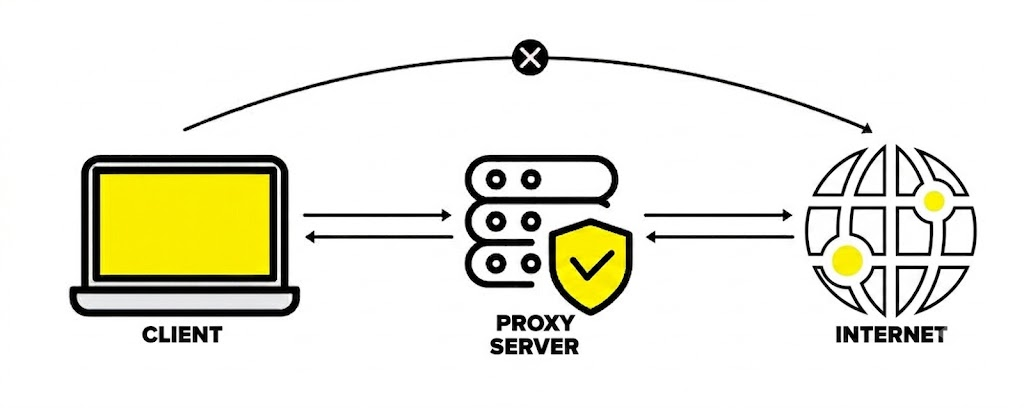
A proxy server works like a traffic controller between your device and the internet. Instead of sending requests directly to websites, your device sends requests to the proxy server first.
Step-by-Step Working Process
- You enter a website address in your browser.
- The browser sends the request to the proxy server.
- The proxy server receives the request.
- The proxy server checks its rules, cache, or security settings.
- The proxy server forwards the request to the target website.
- The website sends the response back to the proxy server.
- The proxy server returns the response to your browser.
Request and Response Flow
| Step | Action |
|---|---|
| 1 | User requests a website |
| 2 | Request reaches proxy server |
| 3 | Proxy processes request |
| 4 | Proxy sends request to website |
| 5 | Website sends response |
| 6 | Proxy forwards response to user |
An important feature of many proxy servers is caching. If multiple users request the same webpage, the proxy server may store a copy locally. Instead of downloading the page repeatedly, it serves the stored copy, making browsing faster and reducing bandwidth usage.
What is the Use of a Proxy Server?
Proxy servers are used for many different reasons. Their usefulness depends on the environment and the user’s goals.
Privacy and Security
One of the biggest reasons people use proxy servers is to hide their IP address. When a proxy server forwards your request, websites see the proxy’s IP address instead of your own. This provides a level of privacy and helps reduce direct exposure of your network information.
For businesses, proxy servers can also filter malicious websites, monitor traffic, and enforce internet usage policies. This helps organizations protect employees and company resources from cyber threats.
Accessing Restricted Content
Sometimes websites restrict content based on geographical location. A proxy server located in another region can allow users to access content that might otherwise be unavailable in their area. This capability is commonly used for testing websites, accessing region-specific resources, and conducting research.
Faster Browsing Through Caching
Many proxy servers store frequently visited webpages. If another user requests the same page, the proxy can provide the stored version instantly. This reduces internet traffic and improves loading speed. Schools, offices, and large organizations often use this feature to save bandwidth and improve performance.
Types of Proxy Servers
There are several types of proxy servers, each designed for different purposes.
Forward Proxy
A Forward Proxy sits between users and the internet. It is the most common type of proxy server. When users browse the web, requests pass through the forward proxy before reaching websites. This type is widely used for privacy, filtering, and access control.
Reverse Proxy
A Reverse Proxy works on behalf of servers rather than users. Instead of protecting users, it protects web servers. Reverse proxies are commonly used for load balancing, security, and handling large amounts of traffic. Popular websites often use reverse proxies to improve performance and reliability.
Transparent Proxy
A Transparent Proxy intercepts traffic without requiring user configuration. Schools, offices, and public networks frequently use transparent proxies to monitor and control internet activity. Users often do not even realize a proxy is being used.
Anonymous Proxy
An Anonymous Proxy hides the user’s IP address from websites. This provides greater privacy and helps prevent direct tracking. The website knows a proxy is being used but cannot see the original IP address.
High Anonymity Proxy
A High Anonymity Proxy hides both the user’s IP address and the fact that a proxy is being used. These proxies offer a higher level of privacy than standard anonymous proxies.
SOCKS Proxy
A SOCKS Proxy works with many types of internet traffic, not just web browsing. It supports applications such as gaming, file sharing, email, and streaming. SOCKS5 is the most popular modern version because it supports additional features and better performance.
Comparison of Proxy Types
| Proxy Type | Main Purpose | Best For |
|---|---|---|
| Forward Proxy | User privacy | Web browsing |
| Reverse Proxy | Server protection | Websites |
| Transparent Proxy | Monitoring | Schools, offices |
| Anonymous Proxy | Hide IP | Privacy |
| High Anonymity Proxy | Maximum privacy | Secure browsing |
| SOCKS Proxy | Multiple protocols | Gaming, apps |
Advantages of Proxy Servers
Proxy servers offer several benefits for both individuals and organizations.
Key advantages include:
- Hides your real IP address
- Provides an extra privacy layer
- Controls internet access
- Blocks harmful websites
- Improves network performance through caching
- Saves bandwidth
- Helps manage employee internet usage
- Supports access to region-specific content
- Enhances monitoring and logging capabilities
Many enterprises include proxy servers as part of their cybersecurity infrastructure because they help enforce security policies and improve visibility into network traffic.
Dangers and Risks of Proxy Servers
While proxy servers provide many benefits, they also have risks that users should understand.
One major issue is that not all proxy servers are trustworthy. Some free proxy services may log your browsing activity, collect personal information, inject advertisements, or even sell user data to third parties. Since all your traffic passes through the proxy server, the provider can potentially see a significant amount of your online activity.
Another risk is the lack of encryption. Many proxies hide your IP address but do not encrypt your traffic. This means attackers on the same network could potentially intercept sensitive information if secure protocols are not used. Security experts often emphasize that a proxy should not be considered a complete replacement for comprehensive security solutions.
Performance issues can also occur. A slow proxy server can reduce browsing speed, increase latency, and create a bottleneck for internet traffic. If the proxy server fails, all connected users may lose internet access. Organizations must carefully maintain proxy infrastructure to avoid these issues.
How to Use a Proxy Server?
There are multiple ways to use a proxy server depending on your needs and technical knowledge.
1. Using a Web-Based Proxy
A web-based proxy is the easiest method.
Steps:
- Open a web proxy website.
- Enter the website URL you want to visit.
- Click the browse button.
- The proxy server loads the website through its own connection.
This method does not usually require software installation or browser configuration. It is ideal for beginners. This guide explains what web proxies are and how to use them by simply entering a website URL into a proxy page.
2. Using a Web Browser
Most browsers allow proxy configuration through settings.
You usually need:
- Proxy IP address
- Port number
- Username and password (if required)
After entering these details, all browser traffic routes through the configured proxy server.
How to Use Proxy in Google Chrome?
Google Chrome uses your operating system’s proxy settings.
On Windows
- Open Chrome.
- Click the three dots menu.
- Select Settings.
- Click System.
- Select Open your computer’s proxy settings.
- Enable proxy setup.
- Enter the proxy IP address and port.
- Save the settings.
After saving, Chrome will start using the configured proxy server.
How to Use Proxy in Firefox?
Firefox allows direct proxy configuration inside the browser.
Steps
- Open Firefox.
- Click the menu button.
- Open Settings.
- Scroll to Network Settings.
- Click Settings.
- Select Manual Proxy Configuration.
- Enter the proxy server address.
- Enter the port number.
- Click OK.
Firefox will immediately begin routing traffic through the specified proxy server.
Proxy Server vs VPN
Many people confuse proxy servers with VPNs. Although both hide your IP address, they work differently.
| Feature | Proxy Server | VPN |
|---|---|---|
| Hides IP Address | Yes | Yes |
| Encrypts Traffic | Usually No | Yes |
| Security Level | Moderate | High |
| Speed | Generally Faster | Slightly Slower |
| Setup | Simple | Moderate |
A VPN provides stronger privacy because it encrypts all traffic, while many proxy servers only forward requests without encryption.
Conclusion
A proxy server is an intermediary system that sits between your device and the internet. It receives your requests, forwards them to websites, and returns the responses back to you. Proxy servers are widely used for privacy, security, content filtering, caching, network management, and accessing region-specific content. They come in various forms, including Forward Proxies, Reverse Proxies, Transparent Proxies, Anonymous Proxies, High Anonymity Proxies, and SOCKS Proxies.
Although proxy servers provide useful benefits, they are not perfect. Free or untrusted proxy services can create privacy and security risks. Understanding how proxy servers work, when to use them, and their limitations helps you make informed decisions about protecting your online activities. Whether you are a student, developer, business owner, or casual internet user, learning about proxy servers is an important step toward understanding modern internet technology.