


Alright developer, let’s talk honestly. You may know React, Node.js, or even full-stack development—but if you don’t have a portfolio website, how will people trust your skills? A portfolio is like your digital resume + proof of work. It shows your projects, your thinking, and your creativity. According to recent developer guides, a strong portfolio helps demonstrate not just coding ability but also how you present your work professionally .
Think about it like this: if you go for an interview and say “I know React,” the recruiter may doubt. But if you show a live website built by you, the conversation changes instantly. That’s the power of a portfolio.
What You Will Build in This Guide
In this guide, we are going to build a simple but powerful portfolio website using React and Vite. This portfolio will include:
- Navbar
- Hero section
- About section
- Footer
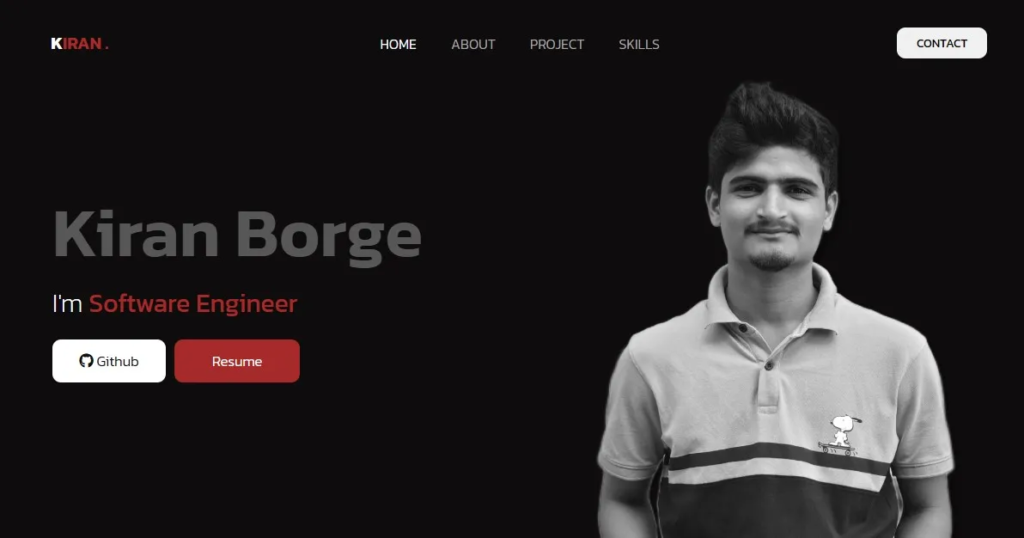
And the best part? You can easily expand it later with projects, contact forms, and animations.
Understanding React and Vite
What is React?
React is a JavaScript library used for building user interfaces. Instead of writing everything in one file, React allows you to break your UI into small reusable components like Navbar, Hero, Footer, etc.
Imagine building a house. Instead of making everything at once, you create rooms separately and then connect them. That’s exactly how React works.
Why Use Vite for React Projects
Now here’s the modern twist—developers are no longer using older tools like Create React App. Today, Vite is the preferred tool because it is super fast and lightweight. It provides instant updates and faster builds .
In simple words:
- Faster development
- Instant reload
- Better performance
That’s why we are using React + Vite combination.
Setting Up Your Development Environment
Installing Node.js
Before starting, you need Node.js installed. It helps you run JavaScript outside the browser.
👉 Download it from official website and install.
Creating React Project with Vite
Now open your terminal and run:
npm create vite@latest portfolioThen go inside folder:
cd my-portfolioInstalling Dependencies and Running Project
Install required packages:
npm installStart your project:
npm run devNow open browser:
Boom! Your React app is live.
Project Folder Structure Explained
Importance of Clean Structure
A messy project is like a messy room—you waste time finding things. A clean structure makes your code easy to manage and scale.
Understanding Each Folder and File
Your project should look like this:
my-portfolio/
│── public/
│── src/
│   │── components/
│   │   │── Navbar.jsx
│   │   │── Hero.jsx
│   │   │── About.jsx
│   │   │── Footer.jsx
│   │── App.jsx
│   │── main.jsx
│── index.html
│── package.json
Each component has its own file. This is called modular design, and it is very important in React.
Building Portfolio Components
Creating Navbar Component
import React from 'react';

const Navbar = () => {
    return (
        <nav>
            <h1>My Portfolio</h1>
            <ul>
                <li><a href="#about">About</a></li>
                <li><a href="#projects">Projects</a></li>
                <li><a href="#contact">Contact</a></li>
            </ul>
        </nav>
    );
};

export default Navbar;
This navbar helps users navigate your website easily.
Creating Hero Section
import React from 'react';

const Hero = () => {
    return (
        <section>
            <h2>Welcome to My Portfolio</h2>
            <p>Hi, I'm a software developer passionate about creating amazing applications.</p>
        </section>
    );
};

export default Hero;
This is the first impression section. Make it attractive!
Creating About Section
import React from 'react';

const About = () => {
    return (
        <section id="about">
            <h2>About Me</h2>
            <p>I am a React developer with experience in building web applications.</p>
        </section>
    );
};

export default About;
Here you explain your journey, skills, and experience.
Creating Footer Component
import React from 'react';
const Footer = () => {
return (
<footer>
<p>© 2025 My Portfolio. All rights reserved.</p>
</footer>
);
};
export default Footer;Footer adds professionalism and completeness.
Integrating Components in App.jsx
import React from 'react';
import Navbar from './components/Navbar';
import Hero from './components/Hero';
import About from './components/About';
import Footer from './components/Footer';

const App = () => {
    return (
        <>
            <Navbar />
            <Hero />
            <About />
            <Footer />
        </>
    );
};

export default App;
How React Combines Components
React works like Lego blocks. Each component is a block, and App.jsx connects them together.
Running and Testing the Website
Run again:
npm run devOpen browser:
Now your portfolio is live.
🚀 Enhancing Your Portfolio Websit
Adding Projects Section
You can create a Projects component and showcase your work. This is the most important part because recruiters focus here.
Adding Contact Form
Use EmailJS or simple form to allow people to contact you.
Making Website Responsive
Make sure your website works on:
- Mobile
- Tablet
- Desktop
Modern portfolios focus heavily on responsiveness and UI experience.
📈 Best Practices for Portfolio Website
UI/UX Tips
- Keep design simple
- Use good colors
- Add animations
- Highlight important projects
SEO Tips for Portfolio
- Use proper headings (H1, H2)
- Add meta tags
- Use keywords like React Developer Portfolio
- Optimize images
Conclusion
Creating a portfolio website using React is not just a project—it’s your personal brand on the internet. With tools like Vite, development has become faster and easier than ever. You started with a simple structure, built components, connected them, and now you have a working website.
But don’t stop here. Add projects, animations, and real-world features. Your portfolio should grow with your skills. The more effort you put into it, the more opportunities you attract.
Latest Posts :
- What Is My IP Address? Find, Check & Understand Your IP
- How to Buy a Domain Name (Step-by-Step Guide) | How to Buy Domain from GoDaddy
- What is a Proxy Server? Complete Guide to Proxy Servers, Types, Uses, Working, Risks, and Setup
- Create Portfolio Website using React
- What Is End-to-End Encryption? How WhatsApp Keeps Chats Secure